You now know how to read from standard input and write to standard output. You also know how to format the data for pretty printing, or for reading specially formatted records. Sooner or later, you’ll need to read data from and write data to files on disk. In this section, we’ll implement a minimal, yet surprisingly useful, note-taking app for the command line. The app should do the following:
- Take a filename to write notes into a command-line argument.
- Read user input from the standard input stream and write it into a file.
- If the file exists, prompt the user about whether to overwrite the file, append to it (continue writing), or quit.
Figure 6.5 illustrates the workflow of our note-taking app.
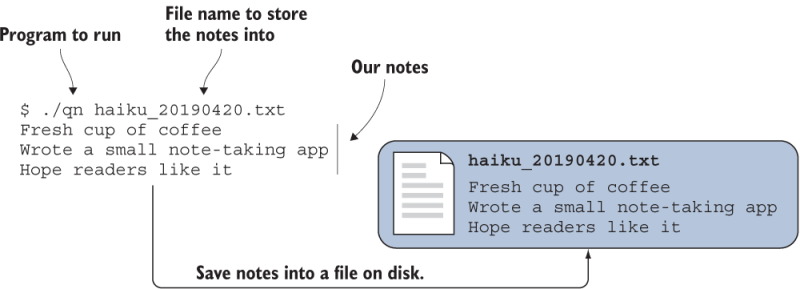
Figure 6.5 Illustration of a simple workflow for our note-taking app
What does it take to write some text to a file? For example, here’s what my minijournal entry looks like this morning:
Fresh cup of coffee
Wrote a small note-taking app
Hope readers like it
Nothing fancy, just some text, spread across a few lines. It’s also a Haiku poem, but that’s not crucial for this exercise. To write this note, while considering the specifications above, my command-line experience with the app (let’s call it qn, short for quick-note) will look like listing 6.6.
Listing 6.6 Writing a short note with the qn app
./qn
STOP Usage: qn <filename>        ❶
./qn haiku_20190420.txt
Fresh cup of coffee              ❷
Wrote a small note-taking app    ❷
Hope readers like it             ❷
^C                               ❸
cat haiku_20190420.txt           ❹
Fresh cup of coffee
Wrote a small note-taking app
Hope readers like it
❶ Shows the usage message if filename not provided
❷ This is me typing on the keyboard.
❸ I quit the app by pressing Ctrl+C.
❹ Prints the contents of the file to the screen
In summary, we want an app to quickly jot down some notes in the file of our choice, stored as a plain text file that can be easily read. The ability to resume writing to an existing file, though not shown in listing 6.6, would also be a nice feature. Finally, we should have some protection from accidentally overwriting an existing file. By implementing these features, you’ll learn the most important elements of Fortran for working with files. Ready? All right, then, let’s get started.