When writing a parallel Fortran program, you don’t have to worry about whether you’re writing a multithreaded concurrent application that’s meant to run on a single core, a shared-memory multicore application, or a distributed memory application. The code that you write is independent of the underlying architecture. Fortran introduces the concept of image, which identifies parallel processes and can map to one or more threads in a single core, or multiple cores in a shared- or distributed-memory system. For example, if you ran multiple images on a single core, the application would behave very much like a threaded application in some other language, like C or Python. This would give you concurrency without necessarily cutting down on the compute time. On the other hand, if a separate core was available for each image, the application would speed up significantly. This way, you focus on the parallel algorithm and let the compiler do the dirty work when it comes to executing the program on different architectures, using the Single Program, Multiple Data (SPMD) model (see sidebar).
Fortran parallelism follows the so-called Single Program, Multiple Data (SPMD) model. With SPMD, a single program is replicated on each invoked parallel process, with its own independent set of data objects. In a nutshell, this means that if we invoke the program on, say, four parallel images, each processor will run an exact copy of the same program and will have an independent copy of the working data in local memory. This is true regardless of whether the program is running on a shared-memory or distributed-memory system. The logic inside the program then determines and assigns a different workload for each image and, if necessary, exchanges data between images. SPMD is the most common style of parallel programming.
The implication of the SPMD paradigm is that you can invoke any serial program in parallel, without modifications! It’s easiest to illustrate this with the simplest meaningful program (figure 7.6).
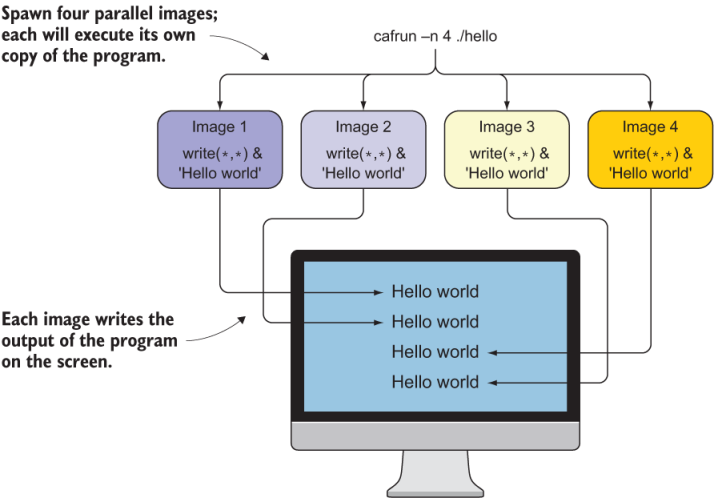
Figure 7.6 A serial “Hello, World!” program executed in parallel on four images
Now go ahead and try running the weather_stats program in parallel using, for example, two images:
cafrun -n 2 ./weather_statsThe output is the same as when we ran this program, but repeated twice:
Maximum wind speed measured is    40.9000015     at station 42001
Highest mean wind speed is    6.47883749     at station 42020
Lowest mean wind speed is    5.43456125     at station 42036
Maximum wind speed measured is    40.9000015     at station 42001
Highest mean wind speed is    6.47883749     at station 42020
Lowest mean wind speed is    5.43456125     at station 42036
If you look at figure 7.6, this is not surprising at all. What you did is load a copy of the weather_stats program on two images, and each of them ran it and wrote their respective output to the screen. Now you must be thinking, This can’t be super useful, can it? This is where inquiring about the images within the program comes in! You, the programmer, have to tell the images what to do differently. Looking back at the diagram in figure 7.5, we should tell each image to work on a different subset of the data. Let’s see how we can do that by inquiring about the images themselves.