In this section, we’ll use teams to augment our tsunami simulator and assign different roles to parallel images working concurrently. For brevity and to not get bogged down in the details of what the specific roles could be in real-world simulation software, we’ll create only two teams: the compute team and the logging team. While the compute team is churning away at the heavy task of number-crunching, the logging team will monitor and report the progress of the simulator. Logging is a relatively lightweight task, so we’ll assign only one image to the logging team, and the rest will go to the compute team. Thus, if we run the program on four parallel images, one will be logging progress, while the remaining three will be crunching numbers. This is a simplified variant of the approach illustrated in figure 12.1.
The updated tsunami program that uses teams will look as shown in listing 12.1. This listing shows only the added code relative to where we left off with the tsunami simulator in chapter 10. Don’t worry about coding this up just yet; here, I’m merely giving you an overview of what’s coming later in the chapter.
Listing 12.1 Introducing teams to the tsunami simulator
program tsunami

  use iso_fortran_env, only: team_type    ❶
  ...
  type(team_type) :: new_team             ❷
  integer :: team_num                     ❸
  ...
  team_num = 1                            ❹
  if (this_image() == 1) team_num = 2     ❺
  form team(team_num, new_team)           ❻

  change team(new_team)                   ❼
    if (team_num == 1) then
      ...                                 ❽
    else if (team_num == 2) then
      ...                                 ❾
    end if
  end team                                ❿

end program tsunami
❶ Imports team_type from the iso_fortran_env module
❷ Declares a new team_type instance
❸ Team number variable that we’ll use to identify sibling teams
❹ All images will go to team 1 by default.
❺ Only the first image will go to team 2.
❼ Changes the current team for each image
❽ The original simulator code is assigned to team 1.
❾ The logging code for team 2 goes here.
❿ Closes the change team construct
This listing summarizes the concepts of forming new teams and switching the execution context between them. First, a team is modeled using a new built-in type, team_ type, available from the the iso_fortran_env module. To begin working with teams, we import team_type and declare an instance of it, in this case new_team. We also need a unique integer scalar to refer to different teams by their number, in this case team_num. This variable is used to assign images to different teams. In the form team statement in this example, we assign all images to team 1, except the first one, which we assign to team 2. The form team statement only creates new teams; it doesn’t affect the execution.
This is where the change team construct comes in–it instructs all images that execute it to switch to a new team–in this case, new_team. Note that change team is a construct, like an if block or a do loop, and is paired with a matching end team statement.
Within the change team construct, the images are now running in their new teams. We can assign code to be executed to each team by checking the value of the team number. Teams will work on different tasks, and will also need to synchronize and exchange data from time to time.
Figure 12.2 illustrates this process, albeit with a bit different team organization.
The key concepts introduced here are forming new teams (form team statement) and changing the current team (change team construct). The form team statement creates new teams and encodes the information about which image on the current team will belong to which new team. The change team construct moves images to the newly created teams. Within the change team construct, the images have new image numbers assigned to them. Teams can work independently from one another, synchronize, and even exchange data.
You may also wonder why we need separate statements for forming and changing teams. We need them because these two operations are fundamentally different in nature: form team instructs the compiler to define new teams and assign images to them, analogous to defining a new function; change team, on the other hand, switches the execution context between already created teams, which is analogous to calling a function. Don’t worry if this seems like a lot and not everything is clear yet. We’ll go over each element in detail as we work through this section.
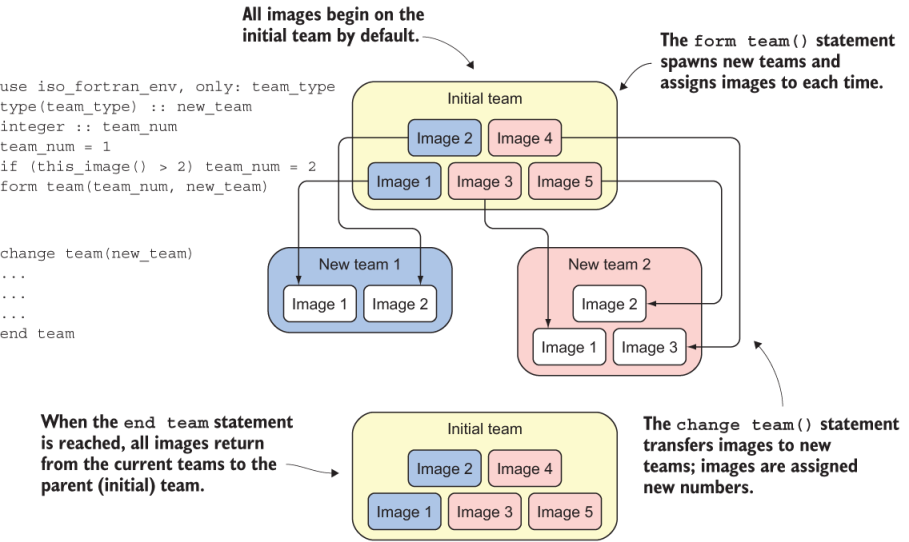
Figure 12.2 Forming and changing teams
Note In case you’re familiar with MPI programming (discussed earlier in the book), whether in C or Fortran, teams are analogous to MPI communicators.