In the previous section, we used teams to distribute work among groups of images. Teams allow us to express some parallel patterns and synchronization more elegantly than we otherwise could by controlling individual images directly. Fortran 2018 introduces another new parallel concept called events, provided through the built-in derived type called event_type. In a nutshell, you can post events from one or more images, and query or wait for those events from others. Figure 12.3 illustrates how events are implemented in Fortran.
You can read this diagram in any order. An alert event is an instance of event_ type. Image 1 triggers the alert on image 2 by issuing event post(alert[2]). This statement is nonblocking, which means that image 1 can immediately move on with whatever code follows. All instances of event_type keep a count of posted events internally. This count is incremented on every event post statement, from any image. Image 2 issues event wait(alert). This is a blocking statement, which means that image 2 will wait until the alert is posted. When it finally happens, event wait decrements the internal event count. Alternatively, image 2 can also poll the number of alerts in a nonblocking fashion with the built-in subroutine event_query.
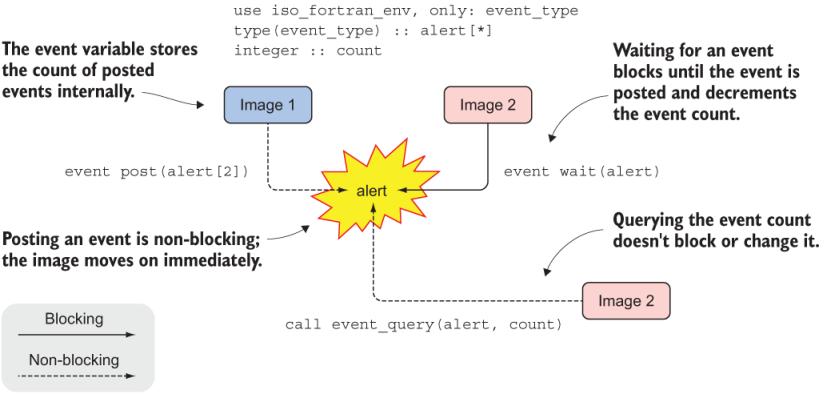
Figure 12.3 Fortran events, where solid and dashed arrows denote blocking and nonblocking operations, respectively
That’s all there is to it! Let’s first tinker with posting and waiting for events in an example of sending a notification, and then we’ll dive into the syntax and rules of events.