Let’s start by creating, compiling, and running your first Fortran program. I assume you’ve already installed the GNU Fortran compiler (gfortran) on your system. If you haven’t yet, follow the directions in appendix A to get yourself set up.
When you have the compiler installed, test it by compiling and running your first Fortran program, as shown in the following listing.
Listing 2.1 Your first Fortran program: hello.f90
program hello                   ❶
  print *, 'Hello world!'       ❷
end program hello               ❸
❶ Begins the program and gives it a name
❷ Prints a short greeting to the terminal
This program does only one thing–it prints a short greeting message to the terminal–as is common for the first example in most programming books. Let’s save it in a file called hello.f 90. Compiling is as simple as passing the source file to the compiler and, optionally, specifying the name of the output (-o) executable:
gfortran hello.f90 -o hello
If you don’t specify the name of the output file with -o, the name of the executable defaults to a.out.
Running the program produces the expected output:
./hello           ❶
  Hello world!    ❷
❶ Runs the program by entering the executable name
❷ The output of the program in the terminal
That’s it–you wrote and compiled your first Fortran program! Let’s take a look at what happens here under the hood. Building a program typically involves two steps:
- Compiling –The compiler parses the source code in a high-level language (here, Fortran) and outputs a corresponding set of machine instructions. In our case, gfortran will read a Fortran source file with a
.f90suffix and output a corresponding binary object file with a.osuffix. Other suffixes for source files, like.f,.f03, or.f08, are acceptable by most compilers; however, I recommend sticking with.f90for consistency. - Linking –Binary object files (
.o), which are the result of the compilation step, aren’t executable on their own. The linker, typically invoked by the compiler under the hood, puts binary object files together into one or more executable programs.
To build our first program, we issued only one command, gfortran hello.f90 -o hello, meaning there weren’t two separate steps for compiling and linking. This is sufficient when the whole program is contained in a single file, and compiling and linking steps are combined together in one command. That command is equivalent to the following listing.
Listing 2.2 Compilation and linking as separate steps
gfortran -c hello.f90        ❶
gfortran hello.o -o hello ❷❷ Links the object to an executable
In this snippet, the compiler option -c means compile only, do not link. This procedure is necessary whenever we need to compile multiple source files before linking them into a single program. As your app or library grows in size, you’ll find that splitting it into multiple files will make it easier to organize and further develop.
I illustrate the build sequence in figure 2.1.
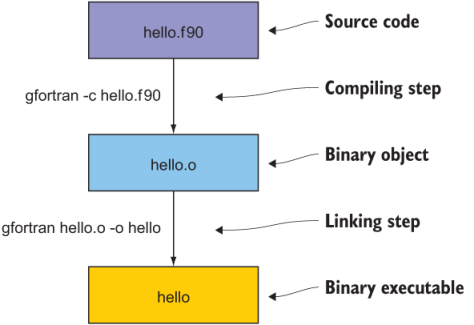
Figure 2.1 Compiling and linking steps that take the input source code and generate binary object and executable files. The source file, hello.f90, is passed to the compiler, which outputs a binary object file, hello.o. The object file is then passed to the linker, which outputs a binary executable file, hello. The linker is implicitly included in the compiler command (gfortran).
The GNU Fortran compiler can take many other options that control language rules, warning messages, optimization, and debugging. I encourage you to go ahead and skim through the manual. You can access it by typing man gfortran on the command line. If the manual pages aren’t available on your system, you can always access the most recent documentation for gfortran at https://gcc.gnu.org/onlinedocs/gfortran.