Let’s see the difference between a subroutine and a function in an example. The following listing defines a subroutine add that’s equivalent to our function sum from the previous subsection.
Listing 3.13 A subroutine that calculates the sum of two integers
subroutine add(a, b, res)
  integer, intent(in) :: a, b    ❶
  integer, intent(out) :: res    ❷
  res = a + b
end subroutine add
❶ Inputs arguments like before
❷ Outputs argument that’s returned to the caller
Here, a and b are input arguments–notice the intent(in) attribute just like in the sum function–and res is the output argument, with the intent(out) attribute. This subroutine calculates the sum of integers a and b and stores the resulting value into res. These arguments need to be matched in type by the arguments passed in the calling program or procedure.
You invoke a subroutine with a call statement:
call add(3, 5, res) ❶❶ Calculates the sum of 3 and 5 and stores it into res
As you can see, it’s impossible to invoke a subroutine from an expression, like we did with a function, because Fortran requires a dedicated call statement. Another oddity is that the subroutine itself doesn’t have any value on return, but any result must be returned as an argument with an intent(out) or intent(in out) attribute. This is analogous to void-typed functions in C, or any Python function that doesn’t have a return statement. This is why, as you’ll see in chapter 12, we’ll use subroutines and not functions to interface void-typed C functions in a portable way.
It’s also possible to declare arguments as intent(in out), which would make them both input and output. For an everyday real-world analogy, consider a toaster:
- Your inputs are electric power, a slice of bread, and a setting, such as toasting time and temperature, and you get a toasted slice of bread as a result.
- The electric power and the toaster setting are
intent(in)arguments here–they’re not modified or returned by the toaster. - The slice of bread, however, is an
intent(inout)argument. - The bread goes in untoasted, and comes out toasted, warm, and crispy.
- The bread is thus modified in-place by the toaster.
Simulating a toaster is thus more appropriate with a subroutine than a function. Figure 3.7 illustrates this scenario. type(bread_type) here is an example of a derived type, which we’ll explore in detail in chapter 8.
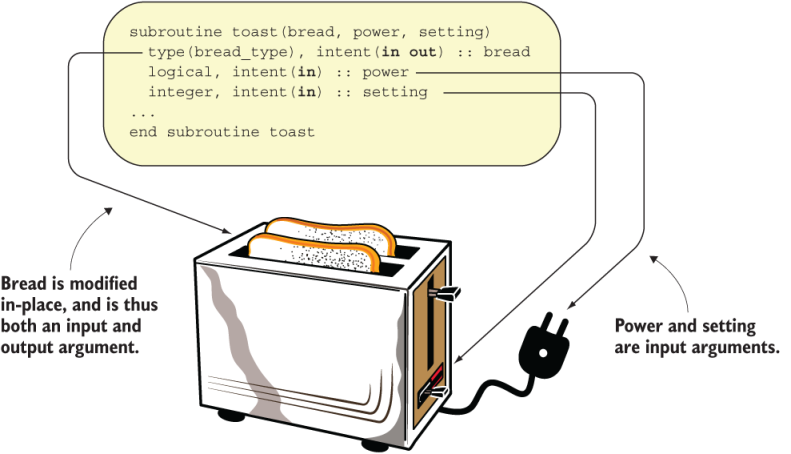
Figure 3.7 An illustration of a subroutine that takes an input/output argument
Practice some intent(in out) arguments by modifying a global variable with a subroutine in the “Exercise 1” sidebar.
Exercise 1: Modifying state with a subroutine
I discussed earlier the use of the intent attribute in the declaration specification of arguments. You can use the intent(in out) attribute to modify a variable in-place. Can you rewrite the subroutine add (listing 3.13) such that it adds b to a and returns a so that its value is updated in the calling program? For example, the expected behavior should be as shown in listing 3.14.
Listing 3.14 Invoking a subroutine that modifies an input argument in-place
program subroutine_example
  implicit none
  integer :: a
  a = 0
  call add(a, 1)
  print *, a         ❶
  call add(a, 2)
  print *, a         ❷
contains
  ...                ❸
end program subroutine_example
❶ Should print 1 to the screen
❷ Should print 3 to the screen
❸ Define the subroutine “add” here.
You can find the solution to this exercise in the “Answer key” section near the end of this chapter.