Let’s look at how the data gathering pattern is implemented in code, as shown in the following listing.
Listing 7.3 Gathering distributed data to image 1
program weather_stats_parallel
  ...
  real, allocatable :: gather(:)[:]
  ...
  allocate(gather(size(ids))[*])        ❶

  gather(is:ie)[1] = max_wind           ❷
  sync all                              ❸
  if (this_image() == 1) then           ❹
    print *, 'Maximum wind speed measured is ', maxval(gather),&
      'at station ', ids(maxloc(gather))
  end if
  ...
end program weather_stats_parallel
❶ Allocates a full-size coarray
❷ Sends max_wind from each image into a subrange of gather on image 1
❸ This forces all images to wait for each other.
❹ Only image 1 will enter this if block and write the results to screen.
This listing includes only the added code relevant for gathering data to image 1. There are five new elements here:
- Declaring a coarray with
real,allocatable::gather(:)[:]. Notice the square brackets! With regular arrays, we used only parentheses. - Allocating a coarray with
allocate(gather(size(ids))[*]). - Sending the data (
max_wind) from each image to image 1 withgather(is:ie)[1]=max_wind. - Synchronizing all images with
syncall. This will make all images wait for each other at this point. This ensures that image 1 doesn’t calculate and print the collective results before it receives data from all other images. - Use
this_image()in theifstatement to allow only image 1 to enter and do the collective calculation and printing to screen.
Figure 7.7 illustrates this pattern.
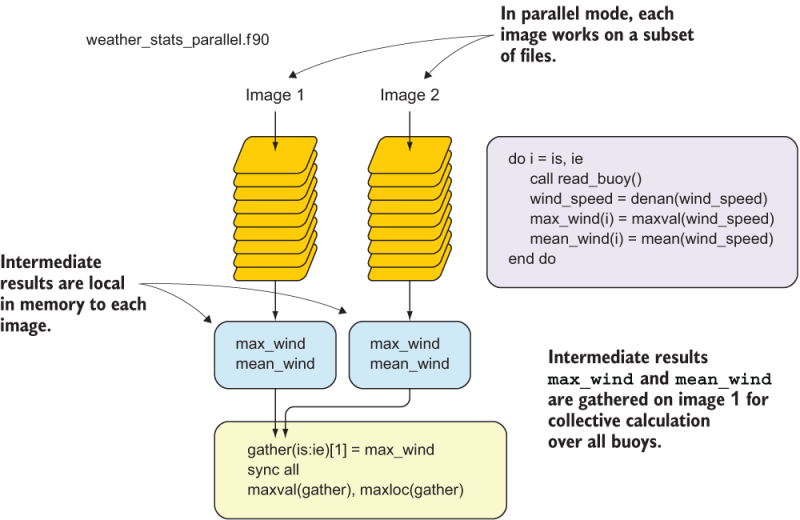
Figure 7.7 The flow of the parallel buoy processing program
The full parallel program is defined in src/weather_stats_parallel.f 90. You can build it by typing make weather_stats_parallel from the weather-buoys directory. To run it in parallel, use the cafrun command:
cafrun -n 4 ./weather_stats_parallelDoes it produce the same results as the serial program? Try to run it with different numbers of images. How does the runtime change between running the program with one, two, three, four, or five images?