Once you have a compiled program executable, it’s not obvious how it was compiled. Specifically, what compiler was used, and were any compiler options used–for example, for debugging or optimization? Fortran’s iso_fortran_env module provides two functions that allow you to get this information at runtime: compiler_version and compiler_options. You get the idea what each of these functions does. Let’s write a program that imports these functions from the iso_fortran_env module, then call them to print this information to the screen. Figure 4.1 illustrates how accessing a module from a main program works, with the new syntax marked in bold.
Once you’ve accessed the module via the use statement, you can use directly in the program any variables or procedures that the module makes available. You also can do this from a function, a subroutine, or another module. (We’ll get to this in a bit.) Listing 4.1 provides the complete program that imports two functions from the iso_fortran_env module and calls them on two print statements.
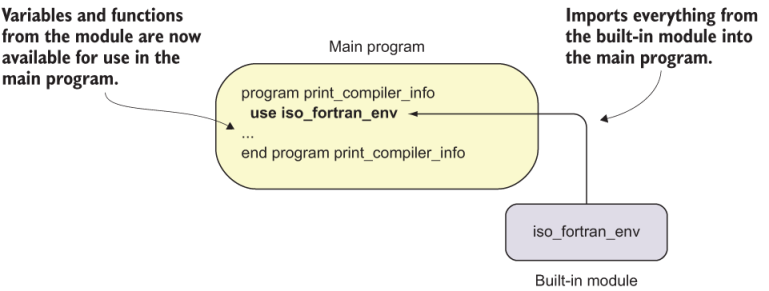
Figure 4.1 Importing variables and procedures from a module into a main program
Listing 4.1 Printing the compiler version and options at runtime
program print_compiler_info
  use iso_fortran_env                                  ❶
  implicit none
  print *, 'Compiler version: ', compiler_version()    ❷
  print *, 'Compiler options: ', compiler_options()    ❸
end program print_compiler_info
❶ Imports everything from the iso_fortran_env module
❷ Prints the compiler version to the screen
❸ Prints the compiler options to the screen
On the second line of this program, we access the built-in iso_fortran_env module with the use statement. This module is available in Fortran out of the box. The use statement means that we want to access entities–variables and/or procedures–from the module. This statement imports every entity that’s defined in the module, including the two functions that we’re looking for.
You must place the use statement after the program statement (or the function or subroutine statement) and before the implicit none statement, or any other declarative statements. The implicit none statement isn’t necessary here because we didn’t declare any variables; however, it’s a good habit to always include it.
Let’s compile and run this program and see the results:
gfortran print_compiler_info.f90 -o print_compiler_info     ❶
./print_compiler_info                                       ❷
  Compiler version: GCC version 8.3.1 20190223              ❸
                    (Red Hat 8.3.1-2)                       ❸
Compiler options: -mtune=generic -march=x86-64 ❸The first line of output tells us the compiler name (GCC), its version (8.3.1), the build date (the date when the compiler was built, 20190223), and the operating system that the compiler was built on (Red Hat). The second line of output gives us the compiler options used at the time we built the program. In this case, we didn’t use any options explicitly, and the compiler automatically inserted options that are specific to the computer (-mtune=generic and -march=x86-64). Watch what happens if we compile with options that aid debugging:
gfortran -fcheck=all -g -O0 -fbacktrace \             ❶
  print_compiler_info.f90 -o print_compiler_info      ❶
./print_compiler_info                                 ❷
  Compiler version: GCC version 8.3.1 20190223        ❸
                    (Red Hat 8.3.1-2)                 ❸
  Compiler options: -mtune=generic -march=x86-64      ❸
-g -O0 -fcheck=all -fbacktrace ❸Here, I added the -fcheck=all -g -O0 -fbacktrace option to compile the program:
-fcheck=allenables all runtime checks, such as exceeding array bounds.-gcompiles the program with additional instructions that allow it to be run by a debugger.-O0disables any optimizations by setting the optimization level to zero.-fbacktracewill cause the program to print a useful traceback in case of a runtime failure, telling you where in the program the error occurred.
These options are specific to gfortran and vary between compiler vendors. The key point is that printing the result of compiler_version and compiler_options functions allows you to get this information at runtime, without having to keep track of this information otherwise. If you rewrite this program as a subroutine, you can easily invoke it at the beginning of your programs so you’ll always know exactly how your program was compiled.
You may be wondering, Why would I care about the compiler information at runtime? First, if you’re evaluating multiple compiler vendors for production performance, it’s helpful to not have to keep track of this information by some other means. Second, you’ll likely use different compiler options between development and production. Specifically, you’ll likely keep optimization off and have extra diagnostic options enabled in development, whereas in production you’ll want full optimization and minimal diagnostics to maximize performance. Allowing your program to carry this information thus helps you to more easily manage your software stack, in development and production.
In this section, we accessed the iso_fortran_env module, which made the built-in functions compiler_version and compiler_options available for use. However, with the general use statement, we don’t know what else may have been imported from that module. In the following subsection, you’ll learn how to import only those variables or procedures that you need, and nothing else.
Fortran provides five built-in modules: iso_fortran_env, iso_c_binding, ieee_ arithmetic, ieee_exceptions, and ieee_features. iso_fortran_env provides useful procedures and parameters that we’ll explore in this chapter, as well as a few others we’ll explore in chapter 11. iso_c_binding provides facilities to interface C functions and data structures. We’ll explore that in detail in chapter 12. The latter three modules provide facilities specific to floating-point arithmetic and aren’t generally as useful as the first two.