If you’ve done any programming before picking up this book, you’ve likely heard of standard input (stdin), output (stdout), and error (stderr). They’re collectively known as standard streams and were introduced in the early days of the Unix operating system to allow easier interaction with the local file system and hardware, such as keyboards, printers, and, later, screens. Today, standard streams are ubiquitous on all mainstream operating systems, including Linux, macOS, and Windows.
In the context of Fortran, standard streams matter when you want to read and write data in a portable manner. Using read * and print * is likely to access standard input and output but isn’t guaranteed by the Fortran standard. Furthermore, if your program encounters an exception and you want to send the error message to the user, the least surprising place to put it is the standard error stream. Fortran 2003 introduced the following named constants with the iso_fortran_env module to allow the programmer to specify standard I/O units in a portable way:
use iso_fortran_env, only: input_unit, output_unit, error_unitI prefer to rename them to their widely used shorthands. The following listing shows an expanded variant of the program in listing 6.2 that will read user input in a portable way, write the message back to standard output, and print a dummy error message (for demonstration) to the standard error.
Listing 6.4 Reading from stdin and writing to stdout and stderr
program standard_streams
  use iso_fortran_env, only: stdin => input_unit, &     ❶
                             stdout => output_unit, &   ❶
                             stderr => error_unit       ❶
  implicit none
  character(len=1000) :: text                           ❷
  read(stdin, '(a)') text                               ❸
  write(stdout, '(a)') trim(text)                       ❹
  write(stderr, '(a)') 'This is an error message'       ❺
end program standard_streams
❶ Imports standard units as their shorthands
❷ Declares the character string variable in which we’ll store user input
❸ Waits for and reads user input
❹ Emits the user-input message to the standard output
❺ Emits an error message to the standard error
This is a rather simple program. We first import standard input, output, and error units from the iso_fortran_env module, renaming them on import so that we can use their shorter names, stdin, stdout, and stderr, respectively. We then use the read statement to read the user-input data from stdin and store it into text. Finally, we emit messages to stdout and stderr using the write statement. write is a more general and versatile variant of print, and we’ll use it almost exclusively from here on.
Since we’re talking about standard streams, it’s a good time to introduce Fortran I/O units, as they’ll be relevant to the rest of this chapter. An I/O unit is like a file handle in other programming languages. It’s a unique identifier that’s assigned to a file when you open it. This number can then be used to reference the file in a unique way until the file is closed. Standard streams also come with I/O units preassigned to them–the input_unit, output_unit, and error_unit constants from the iso_fortran _env module. Internally, I/O units are represented as integer numbers; however, in most cases, you won’t need to worry about their values.
The read and write statements shown in listing 6.4 take two arguments: the first being the I/O unit to read from (or write to), and the second being the format to use to read and write data. These arguments are called unit and fmt, respectively, as illustrated on figure 6.1. In general, you can omit spelling out these keywords in your code if you find them to be too verbose. read and write statements can take quite a few more optional arguments than this. We’ll take a look at some of them a bit later in this chapter.
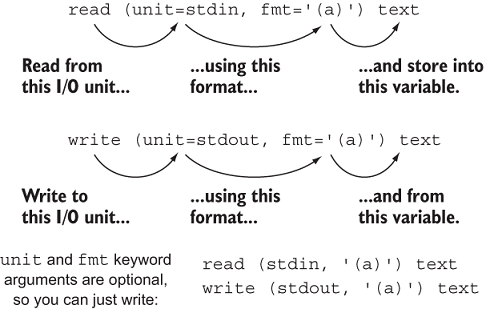
Figure 6.1 The relationship between the read and write statements. In this example, the read statement reads data from the standard input and writes it into a character variable, text. Similarly, the write statement writes data from the text variable to standard output (screen).
To see it in action, compile and run the program in listing 6.4 while redirecting the standard error to a file, as shown here:
./standard_streams 2> log.err      ❶
Hi, there! :)
Hi, there! :)
cat log.err
This is an error message           ❷
❶ This will redirect stderr to the log.err file.
❷ Contents of the file stderr was redirected to
You may ask, when should I use standard error over standard output? Standard output and error streams are typically used to differentiate the output between normal and erroneous operation of a program. You can follow a simple rule of thumb: if the program should report an error or a warning to the user, write it to stderr. Any other output of the program, such as a log or progress bar, should be written to stdout.
If you’re looking for more serious logging capability for your Fortran application, check out the flogging (Fortran logging) library by Chris MacMackin at https://github.com/ cmacmackin/flogging. It features easy logging to file and/or standard output and error streams, built-in log timestamps, colored output, and more! (See figure 6.2.)

Figure 6.2 Example output from the flogging library