We’re now ready to apply the parallel skills we learned in this chapter: referencing coarray elements from other images to exchange data, and synchronizing the images. Following the halo exchange pattern in figure 7.9, for both the water height and velocity arrays, we’ll copy the elements from each end into the halo cells of each of our neighbors. An example of sending the first element from the local image to the left neighbor’s halo cell is illustrated in figure 7.10.
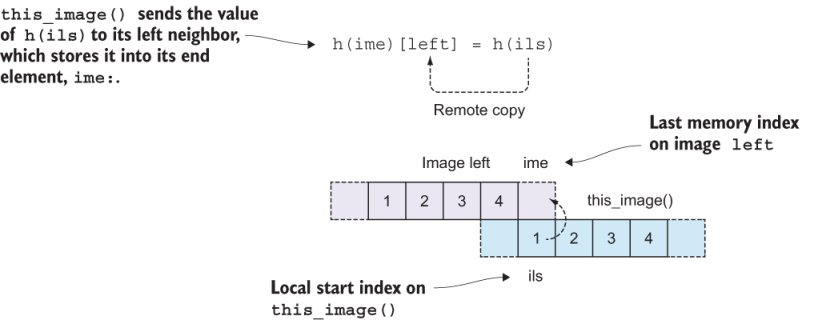
Figure 7.10 Sending a value from the local image to our left neighbor’s halo cell
This pattern is the main addition to the existing code to make it run in parallel. The sequence is
- Update halo cells.
- Synchronize images.
- Solve the equation.
Since we’ve been solving for both water height and velocity, we need to repeat this sequence twice, once for each equation (figure 7.11).
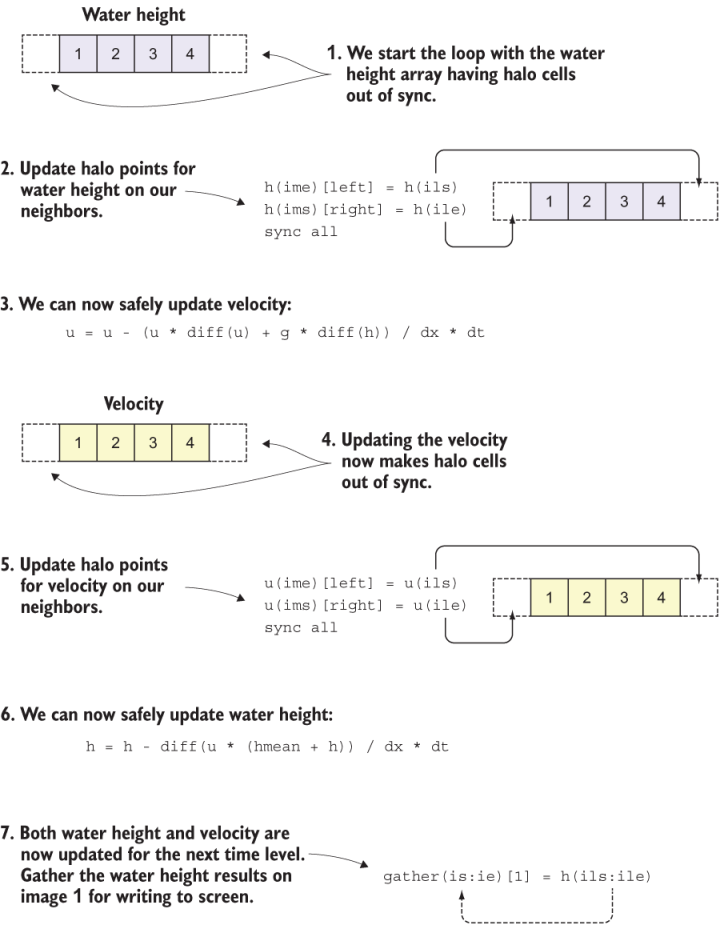
Figure 7.11 Tsunami time integration loop from the perspective of this_image
The following listing shows what this looks like in actual code.
Listing 7.7 The main time loop of the parallel tsunami simulator
time_loop: do n = 1, num_time_steps

  h(ime)[left] = h(ils)                               ❶
  h(ims)[right] = h(ile)                              ❶
  sync all                                            ❷

  u = u - (u * diff(u) + g * diff(h)) / dx * dt       ❸

  sync all                                            ❹

  u(ime)[left] = u(ils)                               ❺
  u(ims)[right] = u(ile)                              ❺
  sync all                                            ❻

  h = h - diff(u * (hmean + h)) / dx * dt             ❼
                                                      ❼
  gather(is:ie)[1] = h(ils:ile)                       ❼
  sync all                                            ❼
  if (this_image() == 1) print *, n, gather           ❽

end do time_loop
❶ Updates halo cells for water height
❷ Waits for all images before proceeding
❸ Updates the solution for water velocity
❹ Waits for all images before proceeding
❺ Updates halo cells for velocity
❻ Waits for all images before proceeding
❼ Updates the solution for water height
❽ Gathers the water height on image 1 and prints it to screen
Notice that before solving for water velocity, u, we update the halo points for the water height, h, and vice versa! We do so because we only need to update the halo points for the variable that was updated in the previous iteration. After each halo update, we sync all images. This ensures that a neighbor image doesn’t proceed to the equation before the current image gets its halo update. In concurrency, this is commonly called a race condition. Because each image runs at its own pace, solving the equations and updating its local data, we need to ensure that each image updates its halo points with the correct data. Synchronizing images ensures this order of operations. Finally, we gather the water height array to image 1 at the end of the loop to write the output to screen in the same format as we did with the serial version of the program.
If you’ve cloned the application’s Git repository on GitHub, you can build and run the application from this chapter like this:
make ch07
cafrun -n 4 src/ch07/tsunami
That’s it; we made it! Our tsunami simulator now runs in parallel and produces bit-for-bit the same results as the serial version. This means that if you run the program on different numbers of images, you’ll get the exact same results every time. This is an important milestone for the development of our app. In the next chapter, we can expand the solver from one to two dimensions and visualize the tsunami from a top-down view, like when you throw a pebble into a pond. Because expanding to two dimensions will demand much higher processing power, parallelism will prove to be crucial in getting to our results faster.
At this point, you have the working knowledge to parallelize simple programs. For problems that require communication between images to get to the final solution, coarrays provide a familiar array-like syntax for sending and receiving data between remote images. For many problems, clever synchronization is key to avoid race conditions. On their own, each of these concepts is relatively simple, but, to be honest, parallel programming is hard! The main difficulty comes from the fact that many things are happening all at once, and they’re often difficult to keep track of. Practicing these patterns on various problems will get you a long way.
In the next chapter, we’ll dive into derived types, which is Fortran’s concept of classes. Derived types will allow you to make high-level abstractions of your data, beyond the basic numeric, logical, and character types. In the context of the tsunami simulator, we’ll use derived types to cast our variables in a form that can be easily expanded to two dimensions, while maintaining the same arithmetic operators and writing code that looks like math on a chalkboard. Having refactored the tsunami simulator into a parallel version, we’ll move forward in parallel and won’t look back!