The simplest algorithm for calculating a difference between two times is to recast the times into a single, common axis, such as number of days since some point in the past. (Recall UNIX time from earlier in the chapter?) Once there, it’s straightforward to calculate the difference–it’s just a matter of subtracting one numerical value from another. We can then convert this result to a whole number of days, hours, minutes, and seconds, for a user-friendly display.
Converting a datetime to a numerical value
The trickiest part of this calculation is casting the datetime instance to a single numerical value. A floating-point number of days since some fixed point in time is a candidate, because a day always consists of exactly 86,400 seconds. (Let’s ignore leap seconds for the sake of this exercise.) Neither a number of months nor a number years would be appropriate because they contain a variable number of days. Real values of hours or minutes could work in theory, but we risk losing floating-point precision for large values (more on this in a bit). An integer number of seconds is another good way to express a time difference, though we’d need to resort to a higher integer kind such as int64 to avoid overflows. For this exercise, I’ll express the time difference as a floating-point number of days since 00:00 January 1 of year 1 AD, as it makes for shorter code. I encourage you to implement a time difference based on an integer number of seconds afterward.
To convert a datetime instance to a number of days, we need to go through the following steps:
- Sum the number of days from all years from year 1 AD up to the previous year. Why not include the current year in this calculation? In this step, we’re counting the days only from whole years. Since the current year is in progress, we’ll need to account for it in a separate step. Given a
datetimeinstanced1, this calculation can be expressed assum([(days_in_year(year), year = 1, d1 % year – 1)])Do you remember the syntax for array constructors (or implieddoloops) from chapter 5? We’re using that trick here again. For each value ofyearfrom 1 tod1%year-1(previous year), we evaluatedays_in_year(year)as each element of the array. In the end, we apply the sum to the array. This kind of expression is a concise way to express accumulators (constructs that accumulate values) in Fortran. We haven’t implementeddays_in_yearyet, but we’ll get to it soon enough. - Calculate the current day of the year. We’ll implement another function,
yearday, to do with this task. At this point, we have the total number of days up to today, excluding the current time of the day in hours, minutes, and seconds. - In this step, we need to express the current time of day in hours, minutes, and seconds as a fraction of the day. This one is relatively straightforward–all we need to do is convert hours, minutes, and seconds each to a unit of days and add them up.
- We sum the results of steps 1-3. For modern dates, the number of days since year 1 is quite large, over 700,000 days. At this scale, small numbers such as a second in day units (1/86400) are lost because of the internal representation of floating point numbers in the default (32-bit) real representation. To work around this issue, we cast the whole expression to 64-bit real values by multiplying the result from step 1 by a literal constant
1.0_real64. This way, small values such as the result of step 3 will be promoted to areal64type before being added to the other terms. For a refresher on how type casting (or coercion) works, take a look back at section 5.2.2.
The whole expression then looks like this:
ndays1 = 1.0_real64                               &     ❶
       * sum([(days_in_year(year),                &     ❷
               year = 1, d1 % year - 1)])         &     ❷
       + yearday(d1 % year, d1 % month, d1 % day) &     ❸
       + d1 % hour * h2d                          &     ❹
       + d1 % minute * m2d                        &     ❺
       + d1 % second * s2d                              ❻
❶ The literal constant 1.0 as a 64-bit real number
❷ Sums days from all previous years
❹ Converts current hours to a fraction of the day
❺ Converts current minutes to a fraction of the day
❻ Converts current seconds to a fraction of the day
In this snippet, h2d, m2d, and s2d are constant real numbers used to convert hours, minutes, and seconds, respectively, to a fraction of the day. Although we could spell them out as literal constants (for example, h2d is just 1.0/24.0), it’s useful to have them as named constants, as we’ll use them a few more times in this subroutine.
How does the days_in_year function work? Simple–if it’s a leap year, return 366, and 365 otherwise:
pure elemental integer function days_in_year(year)
  integer, intent(in) :: year
  if (is_leap_year(year)) then
    days_in_year = 366         ❶
  else
    days_in_year = 365         ❷
  end if
end function days_in_yearThis function would be more complex if I didn’t abstract away the leap year test in its own function, is_leap_year. I’ll leave it as an exercise for you. See the following sidebar.
Exercise 2: Leap year in the Gregorian calendar
Two of our functions, days_in_month and days_in_year, need the information about whether a given year is a leap year or not. A leap year is a calendar year that contains one additional day, February 29. How do you determine whether a year is a leap year? A leap year occurs every four years, with a few exceptions. From the United States Naval Observatory website:
Every year that is exactly divisible by four is a leap year, except for yearsthat are exactly divisible by 100, but these centurial years are leap years ifthey are exactly divisible by 400. For example, the years 1700, 1800, and 1900are not leap years, but the year 2000 is.
Using this description, write a function that returns .true. if the input year is a leap year, and .false. otherwise. For convenience, you can use the built-in remainder function mod.
The solution to this exercise is given in the “Answer key” section near the end of the chapter.
The yearday function (step 2 of the number-of-days algorithm) works in a similar way as the accumulator from step 1, except that it accumulates the number of days in the months, up to the previous month, and adds to the result the current day of the month. Here’s how the function returns the day of the year:
pure elemental integer function yearday(year, month, day)
  integer, intent(in) :: year, month, day                 ❶
  integer :: m
  yearday = sum([(days_in_month(m, year), &               ❷
                  m = 1, month - 1)]) + day               ❷
end function yearday
❶ Year, month, and day are the input arguments.
❷ Sums up the days in the months up to the previous month, and adds the current day of the month to the result
Combining an array constructor with the sum function is an elegant way to write accumulators in Fortran. For brevity, I don’t include the function days_in_month as a listing here, but if you’re curious, take a look at the code in the datetime module in mod_datetime.f 90 in the repository.
Casting the difference to a timedelta instance
Now that we have the code to cast the datetime instances as numerical values, it’s easy to take the difference of the two as days_diff = ndays1 - ndays2. However, now we have the opposite problem: we need to cast days_diff as a timedelta instance. Recall that to create a timedelta instance, we need integer values of days, hours, minutes, and seconds. The following snippet from the code casts a number of days into a timedelta instance:
days_diff = ndays1 - ndays2                            ❶

sgn = sign(1.0_real64, days_diff)                      ❷

days = int(abs(days_diff))                             ❸
hours = int((abs(days_diff) - days) * d2h)             ❸
minutes = &                                            ❸
  int((abs(days_diff) - days - hours * h2d) * d2m)     ❸
seconds = int((abs(days_diff) - days - hours * h2d &   ❸
               - minutes * m2d) * d2s)                 ❸

t = timedelta(sgn * days, sgn * hours, &               ❹
              sgn * minutes, sgn * seconds)            ❹
❶ Takes the difference in days
❸ Converts days_diff to whole values of days, hours, minutes, and seconds
❹ Creates a timedelta instance, preserving the sign
The procedure here is reversed relative to the one in the previous subsection. First you get the whole number of days, then the whole number of hours in the remainder, and so on for the hours and seconds. It’s a bit tedious, but it works. Once we have days_diff expressed as integer values of days, hours, minutes, and seconds, creating and returning a timedelta instance is easy. Note that we use the built-in sign and abs functions to keep track of whether the time difference is positive or negative, and create a timedelta instance accordingly.
Using the sign and abs functions
The built-in function sign takes two arguments that must both be of integer or real type. sign(x, y) returns the value of x with the sign of y. For example, sign(2, -3) returns -2.
abs returns the absolute value of an integer or real number, which is the non-negative value of the number regardless of its sign. For example, abs(-2) is 2, and abs(7.4) is just 7.4.
The complete function
We now have all the pieces we need for a calculation of a timedelta instance given two input datetime instances, and we can put these together into a complete function, as shown in the following listing.
Listing 10.5 Calculating the difference between two datetime instances
pure elemental type(timedelta) function datetime_minus_datetime(d1, d2) result(t)

  class(datetime), intent(in) :: d1, d2                 ❶
  real(real64) :: days_diff, ndays1, ndays2, sgn
  integer :: days, hours, minutes, seconds, year

  real, parameter :: d2h = 24.       ! day -> hour      ❷
  real, parameter :: h2d = 1. / d2h  ! hour -> day      ❷
  real, parameter :: d2m = d2h * 60  ! day -> minute    ❷
  real, parameter :: m2d = 1. / d2m  ! minute -> day    ❷
  real, parameter :: s2d = m2d / 60. ! second -> day    ❷
  real, parameter :: d2s = 1. / s2d  ! day -> second    ❷

  ndays1 = 1.0_real64                               &   ❸
         * sum([(days_in_year(year),                &   ❸
                 year = 1, d1 % year - 1)])         &   ❸
         + yearday(d1 % year, d1 % month, d1 % day) &   ❸
         + d1 % hour * h2d                          &   ❸
         + d1 % minute * m2d                        &   ❸
         + d1 % second * s2d                            ❸

  ndays2 = 1.0_real64                               &   ❸
         * sum([(days_in_year(year),                &   ❸
                 year = 1, d2 % year - 1)])         &   ❸
         + yearday(d2 % year, d2 % month, d2 % day) &   ❸
         + d2 % hour * h2d                          &   ❸
         + d2 % minute * m2d                        &   ❸
         + d2 % second * s2d                            ❸

  days_diff = ndays1 - ndays2                           ❹

  sgn = sign(1.0_real64, days_diff)

  days = int(abs(days_diff))                            ❺
  hours = int((abs(days_diff) - days) * d2h)            ❺
  minutes = &                                           ❺
    int((abs(days_diff) - days - hours * h2d) * d2m)    ❺
  seconds = int((abs(days_diff) - days - hours * h2d &  ❺
                 - minutes * m2d) * d2s)                ❺

  t = timedelta(sgn * days, sgn * hours, &              ❻
                sgn * minutes, sgn * seconds)           ❻

end function datetime_minus_datetime
❶ Both input arguments are datetime instances.
❷ Parameters for converting between different time units
❸ Casts the datetime instances to numeric values
❹ Difference between two datetimes in days
❺ Casts the difference in days to a whole number of days, hours, minutes, and seconds
❻ Creates and returns a timedelta, preserving the sign
This function goes through the three steps I described earlier. First, it converts each of the input datetime instances d1 and d2 to single numerical measures: number of days since January 1, year 1 AD. These values are stored in ndays1 and ndays2, respectively, and it’s straightforward to calculate the difference between the two as days_diff = ndays1 - ndays2. This value can be positive or negative, depending on which datetime instance is greater than the other. The difference in days is then cast to integer values of days, hours, minutes, and seconds to be used to create and return a timedelta instance. This function is quite complex, using several smaller functions under the hood (figure 10.2).
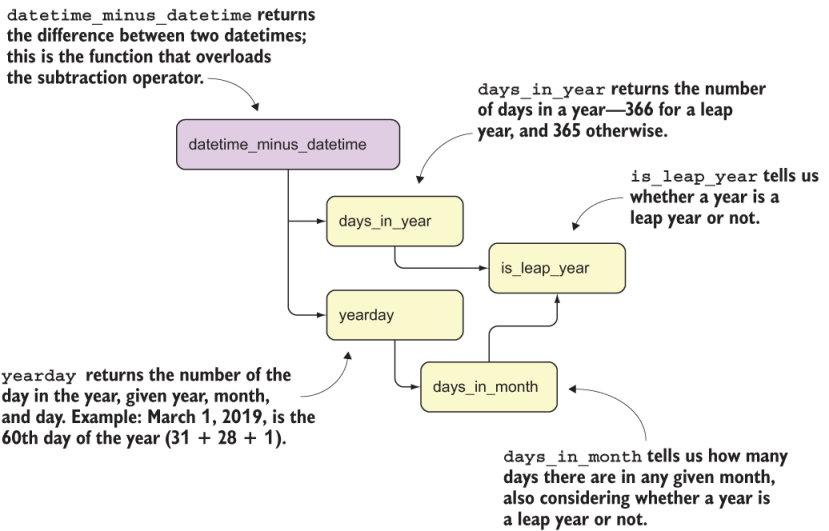
Figure 10.2 Dependency graph for the datetime_minus_datetime function
This diagram shows the functions that datetime_minus_datetime invokes. datetime _minus_datetime uses two functions for its calculations: days_in_year and yearday. Both functions depend on is_leap_year. yearday also depends on days_in_month, which also needs is_leap_year. This is yet another example of the usefulness of breaking down complex calculations into smaller and smaller pieces.