We need to implement looping in our app to do two things:
- Loop over array elements to set initial values of water height and calculate the solution at the next time step.
- Loop for a number of time steps to iterate the numerical solution forward in time.
The main construct for looping or iterating in Fortran is the do loop:
do n = start, end     ❶
  ...                 ❷
end do
❶ Increment n from start to end.
❷ Code inside the loop will execute end – start + 1 times.
Here, n is the integer index that changes value with each iteration. In the first iteration, n equals start. When the program reaches the end do line, n is incremented by one. Internally, the program then checks if n is larger than end. If yes, the program breaks out of the loop and proceeds to the code that follows the loop. Otherwise, the control is returned to the beginning of the loop and another iteration is done. The process repeats until the program exits the loop.
By default, do loops increment the counter by one. However, you can specify a custom integer increment immediately after the end index:
do n = start, end, increment    ❶
  ...                           ❷
end do
❶ Increment n from start to end by increment.
❷ Code inside the do loop will execute (end – start) / increment + 1 times.
In this case, the loop begins with n equal to start and is incremented by the value of increment with each iteration.
There are several rules to remember when coding do loops:
- The loop index (
n) must be an integer variable (not aparameter). start,end, andincrementmust be integers of either sign. They can be variables, parameters, or expressions that evaluate to integer values.- If
startequalsend, the loop body will execute only once. - If
startis greater thanendandincrementis positive, the loop body will not execute. - If
startis less thanendandincrementis negative, the loop body will not execute. - A bare
dostatement without the counter and start and end indices is an infinitedoloop that has to be broken out of by other means, such as theexitstatement. - Loops can be nested (loops inside loops).
- Loops can be named. This is useful for nested loops where you want to associate an
enddowith its matchingdo, as shown in the following listing.
Listing 2.10 Using names with nested do loops
outer_loop: do j = 1, jm          ❶
  inner_loop: do i = 1, im        ❷
    print *, 'i, j = ', i, j      ❸
  end do inner_loop               ❹
end do outer_loop                 ❺
❶ Begins a named outer loop (slower varying)
❷ Begins a named inner loop (faster varying)
❸ This could be any code that we want to iterate.
Although naming loops may at first seem unnecessarily verbose, the names become useful in larger programs with multiple levels of nesting. Furthermore, you can use loop names to break out of a specific do loop from any level using the exit statement.
Finally, the general syntax form of a do loop is shown in figure 2.5.
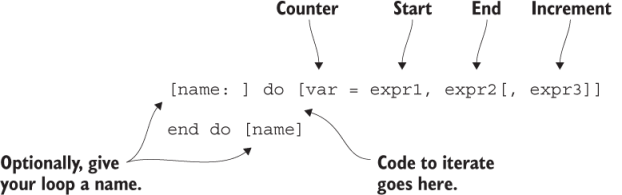
Figure 2.5 General syntax of a Fortran do loop. Optional syntax elements are in square brackets.
In the figure, expr1, expr2, and expr3 are start and end indices (inclusive), and the increment, respectively. name can be any given name.